
Published writing
Blog
Browse recent posts, filter by category, and move through the archive five posts at a time.
CScan.exe
Recently ran into an opportunity that prevented a user from connecting into the network via VPN.
They would click login after entering her username and password and it would take up to 12 minutes before it would attempt to connect. This caused the login attempt to fail due to the secondary password changing several times since it was entered.
After researching the process with tools from SysInternals, it ended up being CScan.exe. The CScan utility was kicking off a scan after entering the credentials and was reading every key in Computer\HKEY_LOCAL_MACHINE\SOFTWARE\Microsoft\Windows\CurrentVersion\Component Based Servicing\Packages. Cleaning up the windows update files with cleanmgr.exe resolved this.
Connecting to the console of a customer without their password!
Connect to a desktop without a password
Have you ever had a need to provide assistance to a customer and needed to view what was on their console while they are not at their desk?
For example one of your customers receives an exception when they launch an application under their profile. You are unable to replicate the exception under your profile. The customer is away at lunch and you have permission to correct this problem. What could you do?
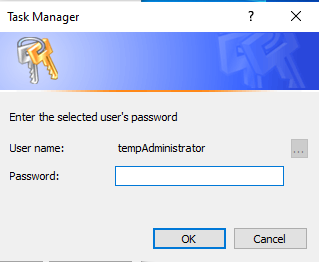
Note: I typically do not recommend this method as it could break the integrity of trust. Someone in the organization could say that you could access their account and performed actions that could violate a company policy. I am documenting this as it does exist and could be used as a last resort. If you do use this method, I would recommend that you communicate clearly and document your actions.
You do not know the password to their account and you do not want to change the password.
Clover And a Android Emulator
Setting up a clover emulator
I was tasked with creating an application to assist a company with their point of sale(POS) process. They utilize Clover for their systems. This is perfect as Clover offers a SDK library for their devices and the devices run on Android. The instructions on their page went smooth until the app update failed to install the libraries.
Install All One By One?
In reality I know now that for the task that I was assigned to, I did not need to install all of the applications on the Clover website. But instead of manually installing each I created a quick script that downloaded and installed into an Android Emulator.
PowerShell To The Rescue!
foreach($line in Get-Content .\devices.txt) {
  Write-Host $line
  Invoke-WebRequest -Uri $line -OutFile $line.split("/")[-1]
  }
After parsing the website and pulling the links that ended with an APK extension into a text file it was time to script this. The previous PowerShell script reads each line of text fi
Office 2016 Default Save Location
Office Default Save Location
Microsoft has been making changes to Office 365 subscription software settings. One of the changes that Microsoft has pushed is the default selected location of Office documents. The default location now is One Drive.
Default Save Location
Change on a Per install basis
You can change this default setting and save files to your computer hard drive or network drive by following the instructions below.
Open any one of the Microsoft Office 2016 programs
Click on the File menu item
Click on Options
Dialog box “Word Options” opens. Click on Save settings located on the left menu
On the right-hand side you will see a checkbox labeled “Save to computer by default”, check it and then click OK.
Now when you go to save a document it will default to your PC.
Registry
If you have a system that fleet of systems that you manage you can set the following registry i
Ws-Fed (Web Services Federation)
WS-Fed
Ws-Fed is an identity federation specification.
Dot.net core provides a framework for quickly adding authentication mechnisms to a MVC project.
Services.AddAuthentication(options =>{ options.defaultScheme = "cookie";
options.DefaultChallengeScheme = "oidc";
}).AddCookie("cookie","options => ...}).AddWsFederation("oidc",options => Options.MetadataAddress = "FederationMetadata.xml";
options.Wtrealm = "Realm"
options.Events.OnTicketReceived += OnTicketReceived;
Options.Events.OnSecurityTokenValidated += OnSecurityTokenValidated;});
servicec#s.AddAuthorization(options => options.AddPolicy("WebAPI", policy => policy.RequireClaim("APIAccess", "Sync")));
You can add custom events etc in the event handers
private Task OnSecurityTokenValidated(SecurityTokenValidatedContext arg)
        {
            //  var xx = arg.Properties.RedirectUri;
            // if (String.IsNullOrEmpty(arg.Properties.RedirectUri))
            // arg.Properties.RedirectUri = "/";